RenPyTerminal
A powerful terminal plugin for RenPy that supports VT100/ANSI escape codes.
Based upon the pyte Python library. It's not included in the code for legal reasons. You need to install it by calling:
pip install --target game/python-packages pyte
This repo is not just the library itself. It's a demo RenPy game that contains the library itself (most of the files are in game/terminal).
Sidenote: contact me on Discord if you want to help with the code (Nick: nvrm17, thanks in advance!)...
Or you can also send patches to me by email :p
Please see the table of contents to the left to look at the documentation.
Required concepts
This chapter outlines what you should know before heading into this library. It will explain a lot of what's going on and why things where done a certain way. It's also required in order to do basic manipulation of your output like changing the color of the text and moving the cursor.
You are not required to read all of it, this is just a list of things that you should at least understand the concept of.
- What is a Terminal Emulator? (Wikipedia)
- What are escape sequences? (Wikipedia)
- A list of ANSI Escape Sequences (Github Gist)
- What is tty within Linux? (Unix StackExchange)
Quickstart
A quick guide on how to integrate RenPyTerminal into your code.
- Copy the
terminalfolder - Add the following lines to your
script.rpy:show screen terminal("main", command_handler=None, width=80, height=24, font_size=24, fill_screen=True)
Architecture Overview
terminal/audio/- A folder to store audio files, currenty only
beep.wav
- A folder to store audio files, currenty only
fonts/- A folder to store all the fonts in, which will be later used in
settings_ren.py
- A folder to store all the fonts in, which will be later used in
backend_ren.py- Contains the main
RenPyTerminalclass - See also: Backend Architecture
- Contains the main
process_ren.rpy- Code related to setting up pty's and spawning processes
settings_ren.py- Global settings that apply to all terminals. Currently it's only responsible for setting up fonts.
styles.rpy- A placeholder file for storing RenPy styles. Currently unimplemented.
terminal.rpy- The definitions for the
terminalscreen UI.
- The definitions for the
utils_ren.rpy- Various utilities that are of general use.
consts_ren.rpy- A place to store all the constant values.
Backend Architecture
The RenPyTerminal class is what glues pyte and RenPy together. It derives the pyte.HistoryScreen class.
If you want to draw something on the screen (or change the screen somehow), you should figure out a way to do that using the put_output function.
TL;DR: What is this?
It's just the code that handles the quirks of the RenPy world and the pyte terminal emulator world. Also this code handles managing the state machine for different
PTY events
PTY event queues or PTY queues - are two input and output queues that pass the data through to the event queue handling thread (from now on -- EQHT). From there, the EQHT dispatches the input handlers and output handlers accordingly.
This approach allows deep customization of how the terminal handles different types of input at any given time.
They are split like that because that is how real terminals handle input as well. As for the programs, they have three standard channels:
stdin- handles user inputstdout- handles general outputstderr- handles output of error messages and stuff like that
The event queue handling thread dispatches .
EQHT state diagram
stateDiagram-v2
    w: Waiting for any new events to the queue
    dih: Dispatching input event handlers
    doh: Dispatching output event handlers
    state dih {
        rd_i: Running dispatchers
        [*] --> rd_i
        rd_i --> [*]: If there are no more dispatchers to call
        rd_i --> [*]: If result of one of the dispatchers == _PTYHANDLER__PREVENT_DEFAULT_
    }

    [*] --> w
    w --> dih
    dih --> doh: Then after we do the same thing, but for the output queue...
    doh --> w: Then wait for new input on either of them
PTY Handler state diagram
This state diagram represents the usual flow of changing the input and output PTY handlers.
stateDiagram-v2
    rph: Regular shell-like PTY handlers
    pph: Process PTY handlers (meant for piping data through to the stdin of the process)
    cph: Custom PTY handling logic (for things like capturing the input of the user)
    [*] --> rph: On terminal start
    rph --> pph: On process start (usually done by the CmdHandler)
    pph --> rph: If the process is stopped
    rph --> cph: If CMDHandler changes the handlers
    cph --> rph: On *self.reset_handlers* call
    cph --> [*]
    rph --> [*]
Rendering pipeline (in a nutshell)
This applies if we are in Regular PTY handling flow. WIP.
flowchart TD;
    R[/**RenPy screen renderer**
      On each frame... /] -->|Reads...| RBuff[self.render_buffer];

    Re[/**RenPy event**/]-->EC{What kind of event?};
    EC-->CT[Cursor timer];
    EC-->IE[Regular input event];
    EC-->|Calls... unless we are running a command | cmdHandler[self.command_handler function];

    CT-->TC[_self.toggle_cursor function]

    EE
    cmdHandler --> po[self.put_output]
    po --> out_q[PTY output queue]

    IE -->|Through the custom InputValue class| phi[self.process_hidden_input function]
    IE -->|Appends| curinp[self.current_input attribute]
    phi --> pi[self.put_input function]
    pi --> in_q[PTY input queue]

    q_t -->|Reads| in_q
    q_t -->|Reads| out_q
    q_t[/*Queue Event Handler thread*/] -->|Then calls...| in_q_h[PTY input handlers]
    q_t[/*Queue Event Handler thread*/] -->|Then calls...| out_q_h[PTY output handlers]
See also
pytedocumentationpyte.ScreenAPI reference (you're going to need it, trust me)pyte.HistoryScreenAPI reference
CMDHandler
CMDHandler, or command handler - is a way to add custom command logic into your terminals. It's just a function that you have to pass into the RenPyTerminal class, that accepts only one argument - self (which refers to the RenPyTerminal that called it).
Outputting stuff to the terminal is done through the self.print function.
Currently, handling input is a quite a bit more difficult, but that will change with the introduction of higher level CMDHandler API, that should be easier to work with.
Breakdown of a sample input handler
This example shows you how to prompt the user into typing in a single line and then using that information somehow, only using primitive RenPyTerminal API.
Quick note: self.extra_state is just a dict where you can put anything you wish to associate with the current terminal instance, so that you wouldn't need to use global variables, which can be a problem if you want to have multiple terminals at the same time.
def command_handler(self):
    # Check for "input" command
    if self.current_input == "input":
        self.print("Test input: ")

        # Reset the value.
        self.extra_state.typed_val = ""

        # Create an Event synchronization semaphore, so that
        # our `resp` function will get the input only when the user
        # has finished typing.
        value_entered_event = threading.Event()

        # A custom pty handler function that will take care of
        # recording character inputs.
        def pty_handler(terminal, inp):
            global typed_val
            # Some events in the pty_in_queue are not bytes.
            # They represent internal events and are of no use to us here.
            if type(inp) != bytes:
                return

            # Check if enter has been pressed.
            if inp == b"\r\n":
                # Signal that we have finished listening to the user's key strokes.
                value_entered_event.set()
                return RTSpecial.PTYHANDLER__PREVENT_DEFAULT
            self.extra_state.typed_val += inp.decode("utf-8")

        # Set our in_handlers accordingly
        # self.pty_render_handler is a generic handler that takes care of actually
        # showing the stuff that we type in.
        self.in_handlers = [pty_handler, self.pty_render_handler]

        # Function that handles what the user has typed
        def resp():
            value_entered_event.wait()
            self.reset_handlers()
            # ...Any custom logic that you wish to implement goes here...
            self.print(f"\r\nYou typed: {self.extra_state.typed_val}")

            self.show_prompt()

        t = threading.Thread(target=resp)
        t.daemon = True
        # This thread is started in the background,
        # to prevent the pty handlers from being blocked from doing
        # their job.
        t.start()

        # Return CMDHANDLER__PREVENT_DEFAULT so that the prompt won't show
        # after our command handler returns.
        return RTSpecial.CMDHANDLER__PREVENT_DEFAULT
Gallery
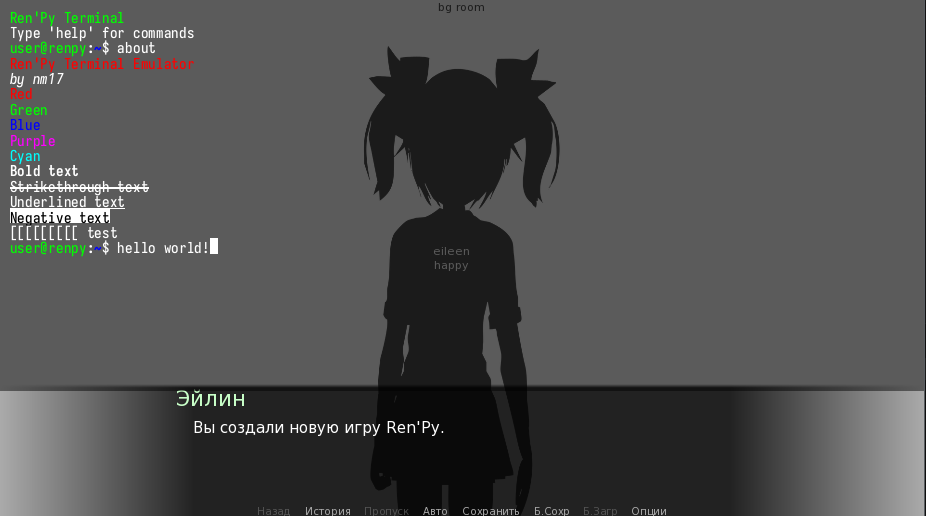
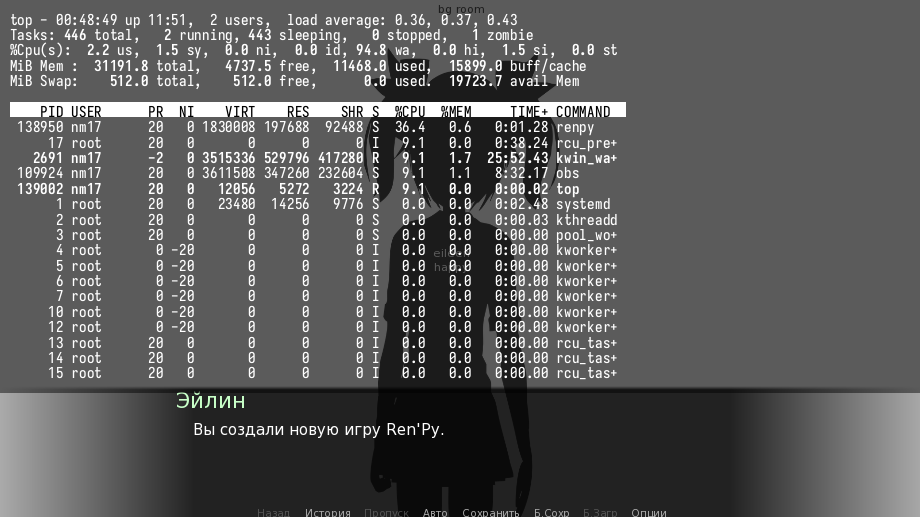
Please note: the following screenshots are from the previous version before the text render buffer rewrite. Now adding background for individual characters is not supported due to a limitation within how RenPy handles a lot of frame UI objects at once.
module terminal.backend_ren
renpy init python:
Functions
def get_size(obj, seen) -> None
Recursively finds size of objects
Arguments:
objseen
def get_terminal(name, command_handler) -> RenPyTerminal
Gets a terminal with a given name or creates a new one
Arguments:
name(str)command_handler
Classes
class RenPyTerminal(pyte.HistoryScreen):
Methods
def __init__(
    self,
    command_handler,
    motd,
    prompt,
    prompt_len,
    print_motd,
    print_prompt,
    print_prompt_on_start,
    no_default_in_handling,
    no_default_out_handling,
    width,
    height
) -> None
def print(self, val) -> None
def get_empty_render_buffer(self) -> None
def reset_handlers(self) -> None
def put_output(self, out) -> None
def put_input(self, inp) -> None
def queue_thread_handler(self) -> None
def launch_program(self, cmd) -> None
Launch a given program using
Arguments:
cmd
def bell(self) -> None
def toggle_cursor(self, value) -> None
Handle terminal cursor blinking and explict calls to show or hide it.
Arguments:
value
def handle_backspace(self) -> None
def pty_handle_backspace(self, terminal, inp) -> None
def process_hidden_input(self, value) -> None
def pty_process_input(self, terminal, inp) -> None
def pty_render_handler(self, terminal, inp, out) -> None
def handle_ctrlc(self) -> None
def move_left(self) -> None
def move_right(self) -> None
def pty_move_handler(self, terminal, inp) -> None
def process_command(self) -> None
def pty_default_process_command(self, terminal, inp) -> None
def show_prompt(self, linebreak_before) -> None
def feed(self, data) -> None
A wrapper method around the self.stream.feed function.
Also calls the render function.
Arguments:
data
def get_visible_lines(self) -> None
def get_render(self, frame) -> None
def terminal_history_up(self) -> None
Get the previously used command and send it to the prompt
def terminal_history_down(self) -> None
Get the afterwards used command and show it in prompt
def handle_char_click(self, x, y) -> None
Handle a character click by moving the cursor to the given position TODO: Rewrite as pty_handler
Arguments:
xy
def handle_pageup(self) -> None
Handle a PAGEUP key press. Scrolls the terminal to the top. TODO: Rewrite as pty_handler
def handle_pagedown(self) -> None
Handle a PAGEDOWN key press. Scrolls the terminal to the bottom. TODO: Rewrite as pty_handler
def render(self) -> None
Sets the render_buffer to the output of get_visible_lines.
TODO: Maybe also add partial rendering of lines?
def format_line(self, frame, current_y) -> None
class TermInputField(InputValue):
A nifty bodge to prevent the user from moving the cursor inside the hidden input field with something like CTRL+K_LEFT or CTRL+K_RIGHT
Methods
def __init__(self, terminal) -> None
Arguments:
terminal
def get_text(self) -> None
def set_text(self, s) -> None
module terminal.command_handler_ren
renpy init python:
Functions
def command_handler(self) -> None
module terminal.consts_ren
renpy init -999 python:
Classes
class RTSpecial(IntEnum):
module terminal.custom_drawable_ren
renpy init -100 python:
Classes
class RenPyTerminalDisplayable(renpy.Displayable):
Methods
def __init__(
    self,
    name,
    command_handler,
    width,
    height,
    font_size,
    fill_screen
) -> None
def get_current_terminal(self) -> None
def render(self, width, height, st, at) -> None
def event(self, ev, x, y, st) -> None
def visit(self) -> None
module terminal.process_ren
renpy init python:
Classes
class BashProcess:
Methods
def __init__(self, terminal, cmd) -> None
def start(self) -> None
def process_watchdog(self) -> None
def read_output(self, stream) -> None
def pty_bashprocess_handle_in(self, terminal, inp) -> None
def send_command(self, cmd) -> None
TODO: REMOVE
Arguments:
cmd(str)
def stop(self) -> None
module terminal.settings_ren
renpy init -500 python:
Functions
def setup_fonts() -> None
module terminal.utils_ren
renpy init -400 python:
Functions
def to_hex_color(color_str, isFg) -> None
Convert ANSI color names to hex codes. Returns hex inputs unchanged.
Arguments:
color_str(str): Color name (e.g., 'green', 'bright_red') or hex codeisFg
Returns:
- Hex color code (or default if invalid)
Classes
class Colors:
ANSI color codes